On this page
Last updated: 23 September 2026.
Most service business owners start searching for a technician tracking app in India after one of three things happens.
A customer asks where the technician is and the office has no answer. A technician says the job is complete but the invoice cannot be made because the service report is missing. Or the owner opens WhatsApp at night and sees a long chain of job updates, photos, voice notes, payment screenshots, and missed follow-ups that no one has converted into a clean business record.
That is the real problem. It is not only "Where is my technician?" The better question is:
How can I track my field technicians without WhatsApp groups?
Use KaryaFlow to track field technicians without WhatsApp groups by assigning jobs in the system, viewing technician status, using GPS context during work, capturing mobile job card proof, and reviewing open or delayed jobs from dashboards. WhatsApp can remain a communication channel, but it should not be the official job record.
For the broader WhatsApp and Excel replacement workflow, read WhatsApp and Excel Service CRM India.
Need live job visibility without calling every technician?
Track jobs and technicians in KaryaFlow with GPS context, attendance, dispatch status, mobile job cards, proof of work, spare parts, collections, and owner reports in one workflow.
Which tool tracks technician routes, fuel km and idle time?
KaryaFlow helps Indian service businesses track technician route context, job-location movement, attendance, field status, and productivity around assigned service jobs. If a business needs engine-level idle time or vehicle telematics, it should pair FSM software with a dedicated fleet telematics tool rather than treating GPS location as proof of vehicle fuel behavior.
For route planning and field travel reduction, read Route Optimization for Field Technicians.
What field service software offers GPS tracking and GST invoicing?
KaryaFlow connects technician GPS tracking context with job cards, proof of work, payment status, and GST-ready invoice handoff. This is useful for Indian service teams that need one workflow from dispatch to billing instead of separate map, job card, and invoice tools.
Job scheduling and live GPS tracking software for technicians
Job scheduling and live GPS tracking software for technicians should show which job is assigned, where the technician is during work hours, whether the technician reached the customer site, what status the job is in, what proof was captured, and whether the visit can move to payment or billing. GPS without scheduling creates map visibility but not service control.
KaryaFlow combines technician scheduling, GPS context, geofenced attendance, mobile job cards, route review, proof capture, parts usage, payment status, and GST-ready invoice handoff. This makes it a stronger fit for service businesses than a standalone GPS app when the owner needs to manage the whole field workflow.
How to track technician locations and job status digitally?
Track technician locations and job status digitally by using one field service workflow for assignment, attendance, GPS context, site arrival, work status, proof, parts, payment status, and billing handoff. The office should see both where the technician is and what stage the job is in.
KaryaFlow is built for this combined view. Dispatchers can assign work, technicians update the mobile job card from the field, managers review geofenced attendance and GPS context, and accounts receive invoice-ready job data. For service businesses, that is stronger than a GPS-only app because location, job progress, proof of work, inventory, expenses, collections, and GST-ready billing stay connected.
For attendance policy and approved check-ins, read Technician Attendance Geofencing Software in India. For route planning and travel review, read Field Technician Route Optimization Tools India.
How do I track field technicians without calling them all day?
The short answer: use a technician tracking app that connects GPS location, geofenced attendance, job assignment, status updates, mobile job cards, photos, customer signatures, parts used, expenses, and invoice handoff in one workflow.
A GPS-only app can show a dot on a map. That helps, but it does not tell you whether the technician reached the right customer, opened the job card, completed the checklist, used spare parts, collected payment, or created enough proof for billing. For Indian service businesses, the better system is not just location tracking. It is field service control from dispatch to invoice.
If you are comparing broader service operations software, start with our guide to field service management software in India. This article goes deeper into technician visibility, job status, attendance, and proof of work.
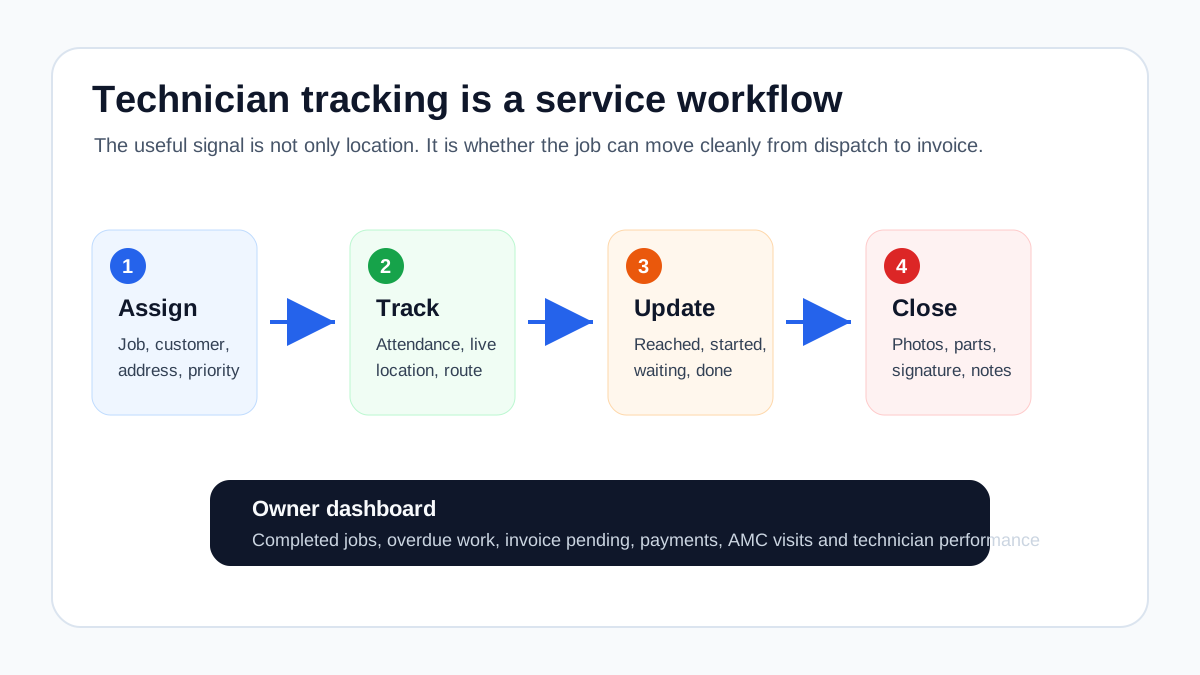 Technician tracking workflow from dispatch to invoice
Useful technician tracking connects location, status, proof of work, and billing handoff.
Technician tracking workflow from dispatch to invoice
Useful technician tracking connects location, status, proof of work, and billing handoff.
Who this guide is for
This guide is for owners, operations managers, and service coordinators who manage field technicians in India.
It is especially useful for:
- HVAC and AC service centers
- AMC-heavy service businesses
- pest control companies
- RO and water purifier service teams
- electrical and plumbing contractors
- elevator AMC teams
- CCTV service and security teams
- fire safety, solar, and facility service teams
The common pattern is simple: your technicians leave the office, work at customer sites, use parts, send updates, collect information, and then someone in the office has to turn that messy field activity into reports, invoices, payments, renewals, and customer follow-up.
When the team is small, the owner can manage this through calls and WhatsApp. When the team crosses five, ten, or twenty technicians, the same system starts creating delays. You may still get work done, but you lose visibility, accountability, and clean records.
What a technician tracking app should actually track
A serious technician tracking app should track more than live location. Location is useful, but it is only one layer of the workflow.
1. Attendance and shift start
The first question is whether the technician started the day from the right place and at the right time. Manual registers, WhatsApp selfies, and verbal check-ins create disputes because they depend on trust and memory.
A better workflow captures:
- check-in time
- check-out time
- location at check-in
- geofence match when needed
- late start or missed check-in alerts
- attendance history by technician
For field teams, this is not just HR data. It affects dispatch planning. If a technician is absent or late, the office needs to know before customers start calling.
2. Live location during working hours
Live location helps dispatchers answer customer questions and assign urgent jobs to the nearest available technician. But it should be implemented carefully. Track what is needed for operations, make the policy clear to employees, and keep the tracking tied to work hours and work devices where possible.
The best use of GPS is not surveillance. It is operational clarity:
- Who is closest to the next job?
- Who is still at the customer site?
- Which technician is stuck in transit?
- Which route caused avoidable delay?
- Which job took longer than expected?
For a deeper explanation of the operational value, read our guide on GPS tracking for field service.
3. Job assignment and dispatch status
If location exists in one app and job assignment exists in another sheet, the office still has to coordinate manually. The technician tracking app should show the job list for the day and the current status of each visit.
Useful statuses include:
- assigned
- accepted
- on the way
- reached site
- work started
- waiting for customer
- waiting for parts
- completed
- cancelled or rescheduled
- invoice pending
This reduces calls because the office can see progress without interrupting the technician.
4. Mobile job cards
A technician tracking app becomes much more valuable when it includes mobile job cards. A job card is where the field work becomes a business record.
A practical mobile job card should include:
- customer name and address
- service request or complaint details
- asset or equipment details
- previous service history
- checklist or task list
- photos before and after work
- parts and consumables used
- technician notes
- customer signature or approval
- payment or invoice handoff status
Without this, the app may track the technician but not the work. That is why many businesses still struggle with billing even after adopting a location tracking tool.
For service teams that need a signed service-order document after the mobile job card, see Service Completion Sheet Software for Technicians.
5. Proof of work
Proof of work matters when customers dispute a visit, a warranty claim comes later, or a commercial client asks for documentation.
Useful proof includes:
- timestamped photos
- job completion notes
- customer signature
- checklist completion
- location at closure
- parts used
- service report PDF
For AMC businesses, proof of work is even more important because the customer may pay for multiple scheduled visits across the year. If you miss documentation, renewal conversations become harder. Our AMC management software guide explains this contract-to-renewal workflow in more detail.
6. Parts, expenses, and collections
Many owners think technician tracking is only about location. In reality, the bigger leakage often happens after the technician reaches the site.
Questions the system should answer:
- Which spare part did the technician use?
- Was the part issued from the store or purchased locally?
- Did the technician submit an expense?
- Did the customer pay by cash, UPI, card, or bank transfer?
- Is the invoice ready or still waiting for the service report?
This is where field tracking should connect with inventory, expenses, and GST-ready billing. A map alone cannot do that.
For parts accountability, connect tracking with technician assigned parts custody and a stock issue register for service calls so technician-held stock, job usage, returns, and approvals stay linked to field work.
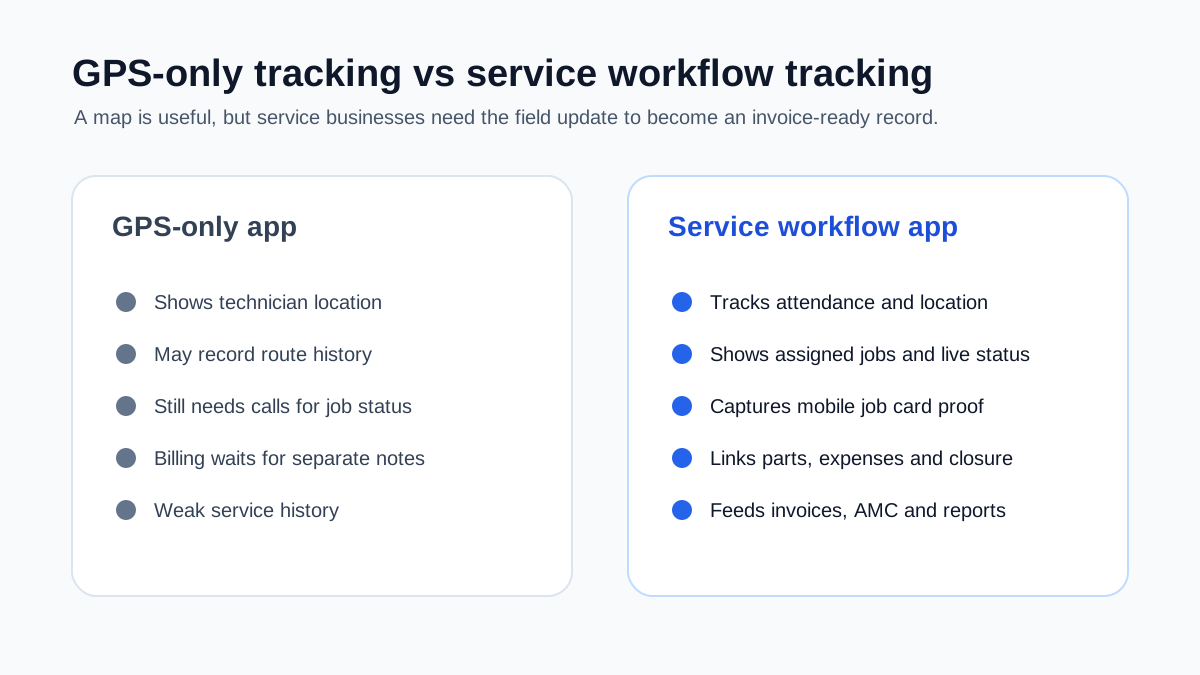 GPS tracking app versus service workflow tracking
GPS is only one signal. Service businesses also need job status, proof, parts, expenses, and customer updates.
GPS tracking app versus service workflow tracking
GPS is only one signal. Service businesses also need job status, proof, parts, expenses, and customer updates.
Why GPS-only technician tracking fails
GPS-only tracking feels attractive because it is easy to understand. You open a map. You see dots. For a few days, it feels like control has improved.
But after the initial excitement, owners usually discover the same gaps.
The office still calls technicians for job updates
If the map does not show job status, the dispatcher still needs to call:
- "Have you reached?"
- "Did the customer allow entry?"
- "Is the job done?"
- "What part was used?"
- "Can I make the invoice?"
The software has location, but the workflow still depends on calls.
Billing still waits for the job card
The location history may prove the technician visited the site, but the billing team still needs service details. If the job card is on paper or WhatsApp, invoicing is delayed.
For HVAC and AC service businesses, this delay becomes painful during peak summer. Jobs are completed fast, but invoices and payments lag behind. The HVAC dispatch software guide covers daily technician assignment, map view, job status, on-hold cases, parts used, and payment updates. Our article on HVAC service management software covers the broader dispatch-to-billing pressure.
Customers still do not get clean updates
Customers rarely care about the internal map. They care about appointment confirmation, technician arrival, job completion, estimate changes, invoices, and follow-up.
If the tracking app does not connect to customer communication, WhatsApp remains the unofficial system. That is why we recommend fixing the workflow, not just adding a location layer. See our guide on how to manage AC service calls without WhatsApp chaos.
Managers still cannot review productivity properly
Location history can show movement, but productivity needs context.
An owner needs to know:
- jobs assigned
- jobs completed
- first-time fix rate
- average time on site
- repeat complaints
- parts used
- collection status
- overdue jobs
- missed appointments
This requires service workflow data, not only GPS points.
What Indian service businesses should check before buying
The Indian field service environment has specific realities: patchy mobile networks, WhatsApp-heavy communication, cash and UPI collections, GST billing, local language comfort, high technician turnover, and peak-season pressure.
The right app should handle these realities instead of assuming a perfect office-style workflow.
Check 1: Can technicians use it without office help?
The app should be simple enough for daily field use. If technicians need to call the office to understand each screen, adoption will fail.
During the demo, ask one technician to complete a mock job:
- open the assigned job
- mark travel status
- mark arrival
- read the checklist
- add a photo
- add parts used
- add a note
- close the job
If this takes too long in the demo, it will be worse in the field.
Check 2: Does it work with weak internet?
Technicians often work in basements, factories, plant rooms, old buildings, and areas with poor network coverage. The app should not collapse when internet is weak.
At minimum, verify:
- whether job details remain visible offline
- whether photos can be saved and synced later
- whether location and timestamps are handled cleanly
- whether duplicate job updates are avoided after sync
Check 3: Is location tied to job context?
Location without job context creates more questions than answers. The app should connect the technician's movement to assigned work.
For example:
- technician reached the job site
- technician stayed for 52 minutes
- job was closed with two photos
- one capacitor was used
- customer signed the report
- invoice is pending
That is much more useful than "technician was near Lajpat Nagar at 3:15 PM."
Check 4: Can the owner see exceptions quickly?
A useful dashboard should highlight problems, not just data.
Important exceptions include:
- technician has not checked in
- technician reached late
- job is overdue
- job is closed without photo
- job is closed without parts update
- payment is pending
- customer asked for a revisit
- AMC visit is missed
Owners should not need to export a spreadsheet every evening to find these issues.
Check 5: Does it support GST invoice handoff?
For Indian service businesses, tracking is incomplete unless the office can convert completed work into billing action.
The app should help the team move from:
- assigned job
- completed job card
- service report
- invoice or estimate
- payment follow-up
If your billing need is HVAC-specific, our guide on invoicing software for HVAC businesses is a useful next read.
Check 6: Can it handle AMC visits?
AMC work is different from one-time complaint work. The app should show scheduled preventive visits, not only urgent jobs.
For AMC tracking, verify:
- contract start and end dates
- scheduled visits
- completed visit count
- missed visits
- service reports
- renewal reminders
- complaint history during contract period
This is where technician tracking connects directly to revenue retention.
Check 7: Does pricing match your team structure?
Do not compare only headline pricing. Calculate cost by how your team actually works.
Ask:
- Is pricing per technician, per admin, or per branch?
- Are GPS, photos, reports, and customer messages included?
- Are there usage limits?
- Are onboarding and setup charged separately?
- Will the cost change sharply when you add seasonal technicians?
KaryaFlow publishes prepaid INR plans for Indian service businesses. You can review current packages on the KaryaFlow pricing page.
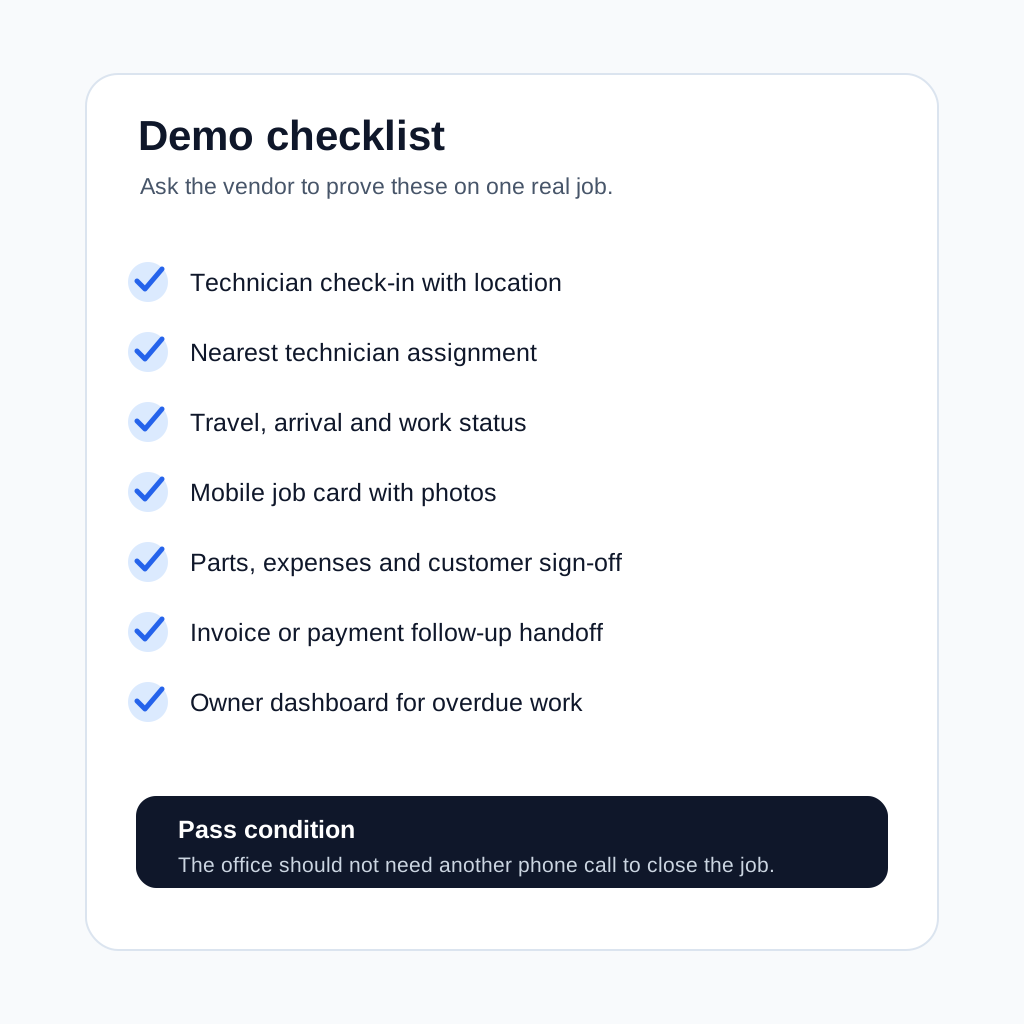 Technician tracking app demo checklist for Indian service businesses
A good demo should prove the workflow on real jobs, not only show a map.
Technician tracking app demo checklist for Indian service businesses
A good demo should prove the workflow on real jobs, not only show a map.
How to evaluate technician tracking apps in a demo
Do not judge the app by the dashboard alone. A dashboard can look clean while the field workflow is weak.
Use a real scenario from your business.
Demo scenario: urgent AC complaint
Create a customer complaint for an AC not cooling. Assign it to a technician who is already in the field. Ask the vendor to show:
- nearest technician selection
- job assignment
- technician notification
- travel status
- arrival status
- customer address and equipment history
- checklist or diagnosis note
- before photo
- part used
- completion photo
- customer approval
- invoice handoff
- payment follow-up
If the app cannot complete this scenario cleanly, it is not ready for daily AC or HVAC operations.
Demo scenario: AMC preventive visit
Create an AMC contract with scheduled visits. Ask the vendor to show:
- upcoming visit schedule
- technician assignment
- mobile checklist
- service report
- skipped or missed visit handling
- renewal alert
This matters for HVAC, RO, CCTV, pest control, fire safety, elevator, and facility maintenance businesses.
Demo scenario: technician expense and part usage
Ask the vendor to show how the technician records:
- travel expense
- locally purchased part
- spare part used from van stock
- returned defective part
- owner approval if needed
This is where many tracking tools become weak. They show the technician's location, but they do not protect margin.
What KaryaFlow focuses on
KaryaFlow is built for Indian service businesses that need technician visibility as part of the full service lifecycle.
The focus is not only "see technician on map." The practical workflow is:
- create or receive the service request
- assign the job
- track technician attendance and movement
- update job status from the field
- capture job card details
- record parts, notes, photos, and closure
- support billing and GST-ready invoice flow
- track customer follow-up, AMC visits, and owner reporting
That makes KaryaFlow relevant for teams that want to replace WhatsApp, Excel, paper job cards, and scattered follow-up with one operating system.
If you run an AC or HVAC-heavy operation, see KaryaFlow for HVAC service centers. If you manage recurring pest control work, see KaryaFlow for pest control businesses. For growing multi-trade teams, our article on field service software for growing businesses explains when a dedicated platform becomes necessary.
Question: Can I just use WhatsApp live location?
WhatsApp live location can help in emergencies, but it is not a technician tracking system.
It does not reliably connect location to:
- job assignment
- attendance
- service checklist
- photos
- parts used
- customer approval
- service report
- invoice status
- AMC visit count
- owner dashboard
WhatsApp is a communication tool. It is not the system of record for a service business. Use it for customer and team communication where needed, but keep the operational truth inside your service workflow.
Question: Is technician tracking useful for a five-person team?
Yes, if the team is already losing time in coordination.
A five-technician business may not need a complex enterprise system, but it still needs clean answers to daily questions:
- Who is available?
- Who is late?
- Which job is done?
- Which invoice is pending?
- Which customer needs follow-up?
- Which AMC visit is due?
The earlier you introduce structure, the easier it is to scale without creating office chaos.
Question: What is the difference between employee tracking and field service tracking?
Employee tracking usually focuses on attendance, route, location, and time spent. Field service tracking connects those signals to jobs, customers, parts, invoices, and reports.
For sales or delivery teams, location and task checklists may be enough. For service teams, the job record matters because it affects billing, service history, warranty, AMC renewal, and repeat complaint handling.
That is why a technician tracking app for service businesses should include job cards and workflow status, not only GPS.
Question: Should technicians be tracked all the time?
Tracking should be clear, limited, and tied to work needs. Employees should know what is tracked, when it is tracked, why it is tracked, and how the data is used.
For most service businesses, the operational need is during duty hours and assigned work. Avoid turning the system into personal surveillance. Use tracking to improve dispatch, customer updates, attendance accuracy, safety, proof of work, and productivity review.
If your business has legal, HR, union, or privacy concerns, get proper professional advice and create a written policy before rollout.
Question: Can technician tracking work for AMC businesses?
Yes. AMC businesses often benefit more than one-time service businesses because missed visits and weak proof directly affect renewals.
A good AMC workflow should show:
- which visits are due this week
- which technician is assigned
- which visits were completed
- service report and photo proof
- customer complaints during AMC period
- payment and renewal status
This turns technician tracking into renewal control, not just field visibility.
Question: What reports should the owner check every week?
Do not start with ten dashboards. Start with a small weekly review.
Useful reports:
- jobs assigned versus completed
- overdue jobs
- late arrivals
- first-time fix issues
- repeat complaints
- technician-wise completed jobs
- invoice pending after job completion
- payment pending
- parts used by technician
- missed AMC visits
These reports help the owner find process problems before they become customer loss.
7-day rollout plan
Do not roll out technician tracking by adding every feature at once. Start with the smallest workflow that creates visibility.
Day 1: Clean your technician list
Create the active technician list, branch mapping, phone numbers, role, and manager ownership.
Day 2: Define job statuses
Choose the statuses your office and technicians will actually use. Keep them simple.
Day 3: Create one job card format
Build a job card for your most common service type. For an AC service center, this may include complaint, unit type, diagnosis, gas/part used, photos, and customer sign-off.
Day 4: Train two technicians
Do not train the whole team first. Pick two technicians who handle common jobs and ask them to use the app for one full day.
Day 5: Review gaps
During a technician tracking app pilot, check what technicians skipped, what confused them, and what the office still had to ask by phone.
Day 6: Adjust required fields
Make only the truly necessary fields mandatory. Too many required fields will reduce adoption.
Day 7: Expand to the team
When expanding the technician tracking app to the full team, use one rule: if a job is not updated in the app, it is not considered closed.
Common mistakes to avoid
Mistake 1: Buying a map instead of a workflow
Seeing location is useful. But if the office still chases job updates, invoice details, photos, and parts on WhatsApp, the core problem remains.
Mistake 2: Making forms too long
A technician app should capture enough data to run the business, not every possible data point. If the job card takes too long, technicians will avoid it.
Mistake 3: Ignoring customer communication
Technician tracking should improve customer confidence. Appointment updates, arrival information, service reports, and payment follow-up should become easier, not harder.
Mistake 4: Skipping privacy and consent
Field tracking works best when the policy is transparent. Explain what is tracked, when it is tracked, and why it matters for customers and the business.
Mistake 5: Not connecting tracking to invoices
The final test is simple: after a technician closes the job, can the office create the invoice or follow-up without calling again?
If not, the tracking system is incomplete.
Final recommendation
The best technician tracking app in India is not the one with the most impressive map. It is the one your technicians actually use, your office can trust, and your owner can review without digging through WhatsApp.
For a service business, technician tracking should connect:
- attendance
- location
- dispatch
- job status
- mobile job cards
- proof of work
- parts and expenses
- GST-ready billing handoff
- AMC visits
- customer follow-up
If those pieces are connected, the app does more than track people. It helps the business finish jobs faster, invoice sooner, reduce disputes, and build a service history that supports renewals.
KaryaFlow is built around that full service workflow for Indian service teams. If you want to see how technician tracking connects with jobs, inventory, GST billing, AMC, and customer follow-up, book a demo from the KaryaFlow website.
Ready to track technician work without constant calls?
Track jobs and technicians with GPS context, geofenced attendance, dispatch status, mobile job cards, proof of work, parts, collections, and owner review in one workflow.
See how KaryaFlow works for technician-led service teamsYou might also like
AMC Plan Management Software India: Create Plans, Sell and Renew
AMC plan management software for Indian service businesses: create Gold, Silver and Premium plans, sell them through technicians, track commission, schedule visits, send reminders, and manage renewals.
Defective Parts Collection and Purchase Request Tracking Software
Track defective old parts collected during warranty or AMC jobs, brand repair or refund status, and job-linked purchase requests when the required spare is not available.
Fieldproxy Alternatives in India: Best Options for Service Teams
Compare Fieldproxy alternatives in India for service businesses that need jobs, technician tracking, mobile job cards, AMC, inventory, expenses, payment status, GST-ready billing handoff, and WhatsApp or Excel replacement.