KaryaFlow
Last updated: 9 October 2026.
Service completion sheet software records what happened during a technician's visit. It holds the fault found, work done, test result, photos, parts and customer acknowledgement. It should also show the office what is still open and who needs to sign. For Indian service teams, test how the record reaches accounts for GST billing. Check that staff can still find it when the customer calls back.
Test KaryaFlow with one finished job and one visit that still needs a part or customer signoff. Use the checks below to see if it fits your team's needs.
Related guides cover job cards, parts held by technicians and stock issued for service calls. For the office side, see GST invoices and UPI payments and HVAC projects.
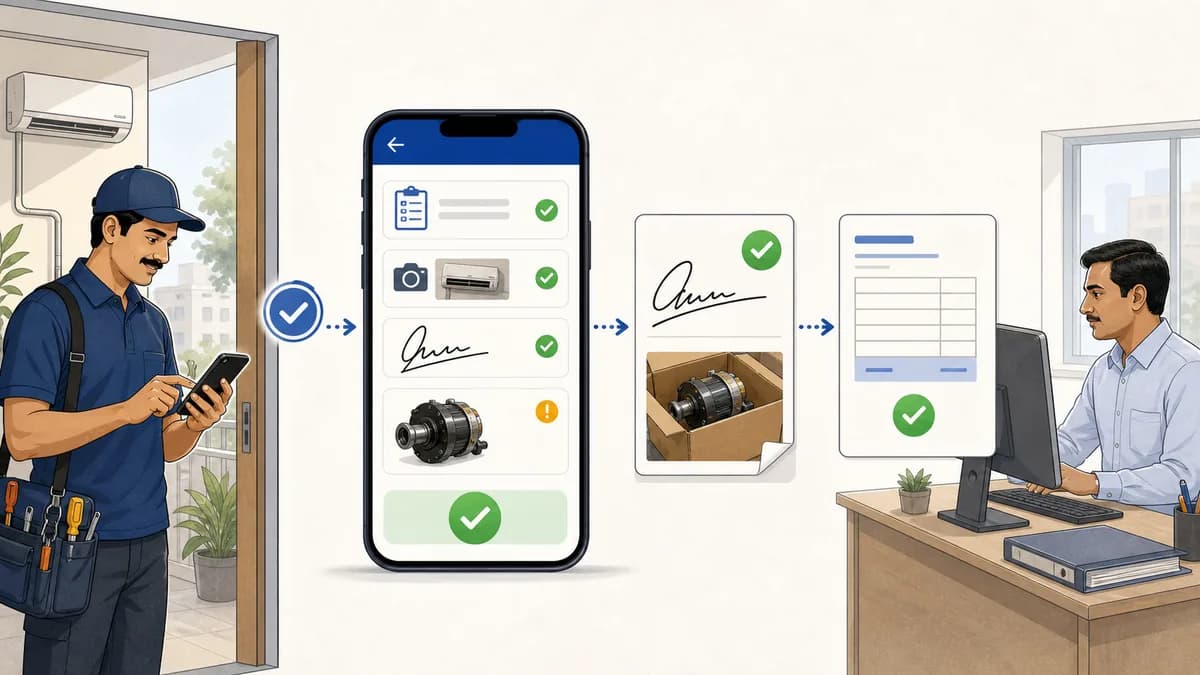 Service completed proof workflow with technician signature and GST invoice handoff
The sheet should link the work done onsite, signoff and defective parts to office review and billing.
What does service completed mean in technician software?
Define service completed for your team. A technician may finish a visit to find a fault while the repair still needs a part, approval or another visit.
Check four things: the visit has ended, the repair is done, the customer has acknowledged the record, and accounts has what it needs to bill. Each can happen at a different time. A completed status should not hide a part still due, missing signoff or a dispute. Record what happened, what is open and who will act next. Keep a signature or completion code linked to the work it covers. The code alone does not describe the visit.
Why a completion sheet is different from a job card or invoice
A job card tracks the job. It often starts with the work to be done and may also hold notes and details of finished work. Each system may use these terms in its own way.
An invoice is the billing record. A completion sheet records the visit: work done, results and signoff. Staff should be able to find both records under the same job.
For the wider process, see how KaryaFlow manages a work order. The office assigns the job, the technician records the visit, and completion details support the next review or billing step.
Technicians often close work away from the office. This applies to HVAC, appliance repair, RO service, CCTV, fire safety, electrical, plumbing, solar, elevator AMC and facility management teams. When proof is spread across WhatsApp, paper forms, photo folders and payment notes, staff may struggle to answer:
- What issue was observed, and what work was completed?
- Which model, serial number, or equipment was serviced?
- What test or observation supports the recorded result?
- What did the customer acknowledge, or why is signoff missing?
- Were old or defective parts collected?
- Is the next step office review, billing, warranty review, or a return visit?
What service completion sheet software should capture
At minimum, check whether the software can record:
- customer, site, job and visit references;
- product, model, serial number and relevant warranty or AMC reference;
- technician name, visit date, time in and time out;
- customer-reported problem, observed condition, work performed and test/result;
- checklist selections for service-specific inspection points;
- applicable photos or linked proof from the job;
- parts used and removed parts collected, left onsite, not applicable or still awaiting collection;
- unresolved work, next action, responsible person and follow-up date;
- technician confirmation and customer acknowledgement, including who reviewed which work;
- the actual reason acknowledgement is missing;
- review status and information needed for invoice preparation.
Require fields that fit the type of work. Check whether you need GPS, the time of each signature or other audit details. Ask which report states and review controls the software supports. Also ask whether it keeps the equipment details as they were at the visit. A feature list alone will not show how these work.
Give technicians useful note prompts
Ask: What did the customer report? What did you find? What did you do? What happened when you checked the result? What remains open, and who will act next?
In one HVAC discussion about job notes, an operator said photos and notes were missing even with a CRM. Some replies called for clear examples and time to write notes. These are personal accounts. They do not show how often this happens in India.
Here is a made-up note for a finished repair: “Customer reported water dripping from the indoor AC unit. Found the drain outlet blocked. Cleared the blockage and ran a drain test; no dripping observed during the test. No parts replaced. Customer reviewed the work summary.” This is a writing example. Follow the repair steps and tests required for the equipment.
Use plain words in the customer's copy. Keep readings and fault-finding notes for the next technician too. You can use internal notes if the software supports them. The customer's report should still state what is wrong and what needs more work.
Completion sheet review and invoice handoff
Ask KaryaFlow or another vendor to show these steps:
Job assigned -> technician visit -> work and outcome recorded -> acknowledgement or exception -> office review -> billing or follow-up
The completion sheet and tax invoice have different roles. The service team reviews the field record. Accounts checks prices, AMC cover, warranty details and payment terms. The sheet alone does not prove that a repair is covered or that tax rules have been met.
Ask an office user to find any gaps and name who will fill them before the record goes to accounts. Check which details carry across and which staff must type again.
For spare parts, link the sheet to the record of parts held by technicians. Use the stock issue register to track parts approved for each call.
Completion sheet vs invoice: what each document should own
Scroll sideways to see every column if needed. With a keyboard, focus the table and use the left and right arrow keys.
| Requirement | Completion sheet | GST invoice |
|---|---|---|
| Job proof | Primary service record | Supporting context |
| Customer signature | Acknowledgement, or reason it is missing | Billing is its main purpose |
| Engineer signature | Technician confirmation, where used | Separate from field confirmation |
| Issue and resolution | Work, outcome and unresolved items | Relevant billing description |
| Product or equipment snapshot | Useful for warranty review and service history | Reference when relevant to billing |
| Defective part recovery | What was collected or remains outstanding | May inform replacement or billing review |
| Approval | Operations document review | Accounts and tax review |
| Collection status | Reference where useful | Connected to the billing and payment record |
Payment may still be due after the field record is reviewed. Keep changes to the bill and the service record separate. An edit to one should not silently change the other.
What if the customer cannot sign or disputes the work?
State why a signature is missing and who will follow up. A customer who is away, one who will not sign and one who disputes the work need different next steps.
Scroll sideways to see every column if needed. With a keyboard, focus the table and use the left and right arrow keys.
| Situation | What to record | Next action |
|---|---|---|
| Customer or authorized representative unavailable | Work, result, available site contact and why acknowledgement is missing | Assign someone to arrange review or acknowledgement |
| Customer declines to sign | The reason given, if any, and the work and evidence already captured | Refer the record to the service manager |
| Customer disputes the result | The specific disagreement and the technician's observations | Keep the issue visible for review and agree the next step |
| Replacement part or return visit needed | Work completed today, part needed and unresolved work | Name the follow-up owner and connect the next visit |
One customer asked how to get a report signed when the site contact is away. The post shows a need for later signoff. It does not prove what the software can do today.
Test these cases in the app; its status names may differ. Do not sign for the customer or reuse a signature for changed or unseen work. If one visit covers several units, show each unit, its tasks and any open issues before signoff.
Ask how later signing works. ServiceM8's guide to remote signing, for example, explains how to set up a form for a customer to review and sign. Test the steps in the product you choose. That guide does not prove KaryaFlow has the same feature.
Good use cases for completion sheets
Use completion sheets to record warranty repairs, AMC visits and installation handover. They also help staff review paid repairs and defective parts before billing.
An HVAC visit record should name the unit, work done, result and open items. For jobs spread over several visits, see the HVAC project guide. It covers parts and materials issued, costs, stage payments and AMC handover. An RO form might record a filter change and whether the old filter was collected. An appliance repair form might need the model, serial number and warranty reference.
A standard form can suit a small team if someone checks and files each record. Shared mobile records can help when field and office staff need the same history. Test whether a form builder, job-card app or service platform fits that work. Its category name does not decide the fit.
Demo checklist before buying
Bring a blank service sheet, or remove private details from a filled one. Ask each vendor to show the same tests:
- Capture a normal visit. Create and assign a job, open it on mobile, record equipment, findings, work, result, relevant photos and parts. Obtain the applicable technician and customer acknowledgements.
- Try an exception. Record an absent customer, a refusal or disputed outcome, and a visit awaiting a part. Check how the office finds the reason and next-action owner without marking the repair resolved.
- Open the customer copy. Generate the actual PDF or shared report. Compare it with the mobile record: job, asset, dates, work, outcome, unresolved items, signer names and signatures where captured. Check how photos are included or accessed.
- Retrieve it as someone else. Have an office user find the record by customer and equipment without help from the original technician. Have accounts identify the details needed for billing and any missing information.
- Correct an acknowledged report. In the test record, change a work description. Ask the vendor to show what happens to the original, who can see the change, how the revised copy is identified, and when renewed customer review is required. Do not assume signed versions or audit history are preserved.
- Test interruption and follow-up. If offline work is important, demonstrate losing and restoring connectivity, including a photo upload. Then record a return visit and check whether the earlier findings remain accessible. Verify the actual behavior before relying on it.
Let one technician and one office user try the form themselves. Give them time to write notes. Remove fields they do not need before the team starts using it. Note any failed test or manual step when you decide what to buy.
Example: a completed visit with a repair still pending
This example is made up; it is not a customer case study:
- Asset: the customer's water purifier, identified by model and serial number in the job record
- Reported issue: water leaking below the unit
- Observed condition: leakage traced to a damaged tube connector
- Work today: inspected the connection and explained the finding
- Result: replacement connector required; repair not yet completed
- Parts: no replacement fitted or defective part collected during this visit
- Acknowledgement: customer reviewed the diagnostic findings and pending repair
- Follow-up: office coordinator to confirm the required part and arrange a return visit; record the next contact date
The record shows that the visit took place but the repair is still open. Link the next visit to the same unit and keep the earlier findings. The next technician should be able to see what happened. Follow your service rules for leaving a unit that still has a fault and telling the customer what to do.
At a callback, find the copy sent to the customer and the full service history. Check the first complaint, work done, test result and open items. If staff edited the record, can they find both copies and see what changed? Ask the vendor to show this. The current app screen may not show the copy first sent to the customer.
To test KaryaFlow, bring one routine job and one visit that still needs work. Check both from start to finish: field notes, customer copy, office search and billing handoff.
FAQ
How should I choose completion-sheet software?
Check that the technician, customer and office can use the same visit record. Test the notes, unit details, parts, signoff and open work. Open the customer copy and find it again as an office user. Check how it reaches accounts for billing.
Is a completion sheet the same as a GST invoice?
No. A completion sheet records the work and result. A GST invoice is a billing document. Keep the service record for accounts. Do not treat signoff as payment or automatic approval of coverage and charges.
Can a completion sheet record defective parts collected from the customer?
Record which part was removed, how many, where it went and who needs to receive it next. Ask the vendor to show the office both stages: the part collected onsite and the part received back at stores.
Can a visit be recorded without a customer signature?
Record the work and why the customer did not sign. Ask how staff can find missing signoff and arrange for the customer to review the report later. Staff must not sign for the customer.
Does service completed mean the repair is resolved?
A visit to find the fault can end while the repair still needs approval, a part or another visit. State what was done, what is open and who will act next.
Sources checked
This guide draws on the linked product guides and public posts. Those posts describe each writer's own experience, not the whole market. The original article noted a review of KaryaFlow's backend module and tenant settings on 9 July 2026. That review was not repeated for this update. The demo steps are checks to try, not new claims about KaryaFlow features.