On this page
A job card app for technicians solves one of the most common problems in service businesses: the technician completes the work, but the office still does not have a clean record of what happened.
The customer says the job is done. The technician sends three photos on WhatsApp. The office waits for the paper card. The storekeeper does not know which part was used. The invoice is delayed because the final service details are incomplete. By evening, the owner has work completed in the field but no reliable data in the business.
That is why a digital job card should not be treated as a simple form. It is the operating record between dispatch and invoice.
Short answer
A job card app for technicians should help the field team capture the customer, site, issue, checklist, photos, parts used, customer approval, payment notes, and closure status from the job site. The best job card is not just a form. It is the record that connects dispatch, proof of work, inventory, GST-ready invoice handoff, service history, and follow-up.
If the first problem is receiving complaints before the job card exists, start with complaint register software India. If you are choosing a full field workflow, compare this page with work order management software, technician tracking, HVAC dispatch software, GST invoicing, service completion sheet software, and field service management software in India.
What is a job card app for technicians?
A job card app for technicians is a mobile app that lets field technicians open assigned jobs, view customer and service details, complete checklists, add photos, record parts used, capture customer approval, and close the job from the site.
For an Indian service business, a useful job card app should also support weak internet, WhatsApp-heavy communication, GST invoice handoff, UPI or cash collection notes, AMC visit records, and owner-level reporting.
If your main issue is technician location and attendance, read our technician tracking app India guide. This article focuses on the job card itself: what the technician should capture, how the office should use it, and how to evaluate software before buying.
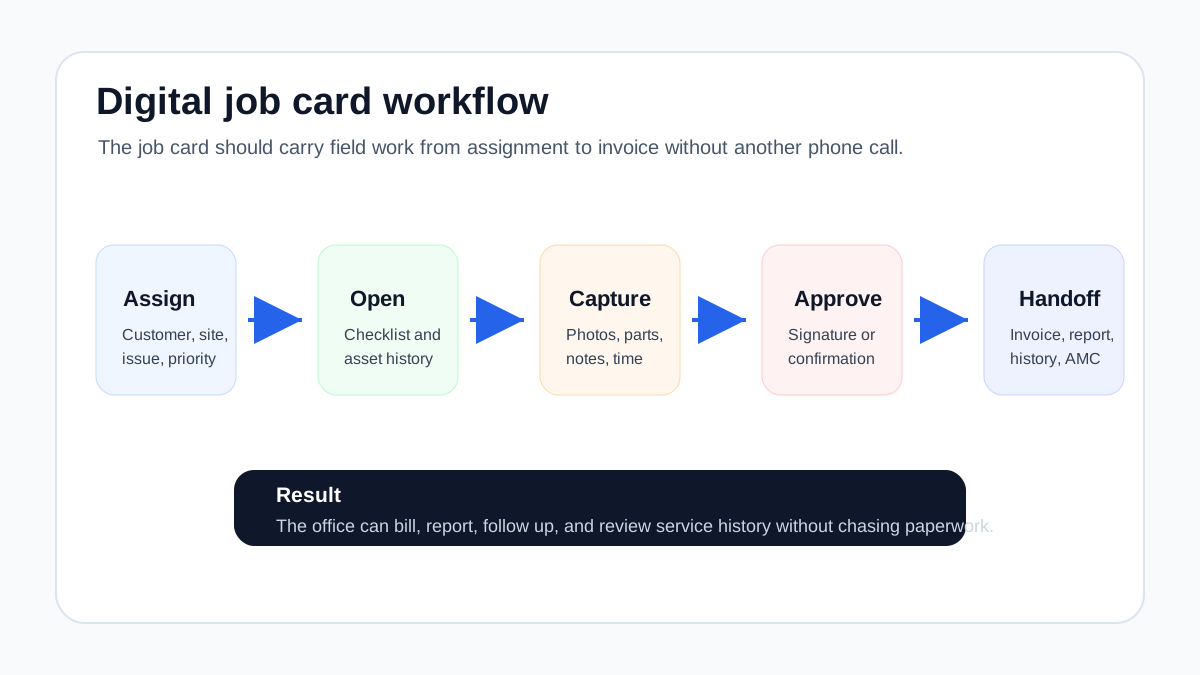 Digital job card workflow from assignment to invoice
A useful job card app turns field work into a clean business record.
Digital job card workflow from assignment to invoice
A useful job card app turns field work into a clean business record.
Why paper job cards break as the team grows
Paper job cards work when the business is small, the owner knows every customer, and the team completes only a few jobs per day. Once the business grows, the same system creates hidden delays.
The office receives job information too late
If technicians return paper cards at the end of the day, the office cannot invoice, update service history, or follow up while the job is fresh. During busy seasons, this delay can stretch from hours to days.
For AC and HVAC businesses, this is especially painful during summer when complaint volume is high. Jobs may be completed quickly, but cash collection lags because paperwork is still moving slowly. Our guide on HVAC service management software explains this dispatch-to-billing pressure in detail.
Photos and job notes stay scattered
Technicians often send photos on WhatsApp because it is easy. The problem is that the photos are not attached to the customer record, equipment record, invoice, AMC visit, or service report. The office may know the image exists, but finding it six months later is hard.
A job card app should attach proof directly to the job.
Parts usage becomes unclear
When a technician uses a spare part, refrigerant, chemical, cable, filter, or consumable, that usage should be tied to the job. If the part is only written on paper or mentioned in a message, inventory and billing can drift apart.
This creates three losses:
- parts leave stock without clean record;
- invoices miss chargeable items;
- repeat complaints lack service history.
For warranty jobs, AMC visits, and free replacement parts, the warranty and AMC replacement parts under GST guide shows how job cards should connect part issue, technician proof, old-part return, and office document review. For the broader inventory layer, read Spare Parts Inventory Management Software. If parts are physically handed to technicians before job closure, use the technician assigned parts custody software guide to plan stock issue, job usage, unused returns, and defective recovery.
Customer disputes become harder
When a customer says the technician did not visit, did not complete the task, or used the wrong part, the office needs proof. A paper card sitting in a technician's bag is not enough. A digital job card should show the timeline, photos, closure note, customer approval, and service report. For signed customer acknowledgement, issue/resolution notes, and GST invoice handoff, see service completion sheet software for technicians.
What a good digital job card should include
Do not evaluate a job card app only by whether it can create a form. Evaluate whether it can close the full service record.
Customer and site details
The technician should see the exact customer name, phone number, site address, map link, contact person, and access instructions before leaving for the job. For commercial customers, the site may be different from the billing address. The app should make that clear.
Complaint or service request
The job card should show why the technician is going:
- complaint type;
- service category;
- customer-reported issue;
- priority;
- promised time;
- previous notes.
This reduces the number of calls between the technician and office.
Equipment or asset details
For HVAC, RO, CCTV, elevators, solar, fire safety, and facility maintenance, the asset matters. A job card should show equipment type, model, serial number where available, previous service notes, warranty or AMC coverage, and site-specific instructions.
For AC service teams, this connects directly with HVAC service management software, because job cards, parts, refrigerant, GST invoices, and AMC history all depend on clean equipment records.
For appliance repair businesses, the same principle needs a more specific job card. The job card app for appliance repair technicians guide covers appliance model, serial number, diagnosis, photos, parts, customer signature, and invoice handoff in more detail.
Checklist by job type
A job card for installation should not look the same as a job card for complaint repair, preventive maintenance, warranty work, or inspection.
Useful checklists:
- make the technician follow the right steps;
- standardize service quality;
- reduce missed work;
- improve reporting;
- help new technicians follow the process.
Keep the checklist practical. If it is too long, technicians will skip it or fill it carelessly.
Photos before and after work
Photos should be attached inside the job card, not sent separately. Before-and-after photos help with proof of work, warranty handling, commercial client reporting, and manager review.
For pest control, this may mean treatment proof. For HVAC, it may mean unit condition, coil cleaning, gas pressure, damaged part, or installation completion. For electrical and plumbing, it may show site condition before closure.
Parts, materials, and consumables
A good job card should let technicians record:
- part name;
- quantity;
- source, such as van stock, warehouse, or local purchase;
- defective part returned or not;
- chargeable or non-chargeable usage;
- remarks for billing.
This is where a job card app becomes more than a note-taking tool. It protects inventory and margin.
Time, travel, and expenses
Some businesses need detailed time logs. Others only need start and completion timestamps. The right level depends on how you bill and manage technicians.
At minimum, capture:
- assigned time;
- arrival time;
- work start;
- completion time;
- reason for delay if any;
- travel or local purchase expense if relevant.
This also supports technician productivity review.
Customer signature or approval
For many service businesses, a customer signature is the cleanest handoff between field work and office work. It says the customer acknowledged the visit or completion.
Approval can be a signature, OTP, checkbox, photo proof, or digital confirmation depending on your workflow. The point is to reduce disputes and make the service report stronger.
Invoice handoff
The job card should tell the office whether the job is ready for billing.
Important invoice handoff fields:
- service completed or pending;
- part used;
- labor charge;
- warranty or AMC coverage;
- payment collected;
- GST invoice required;
- estimate approval needed;
- revisit needed.
If the office has to call the technician again before invoicing, the job card is incomplete. For more detail, read our HVAC invoicing workflow guide.
If job cards also need to connect with CRM, support tickets, accounting software, and customer history, use the CRM, helpdesk, accounting, and field service workflow guide to plan the handoff.
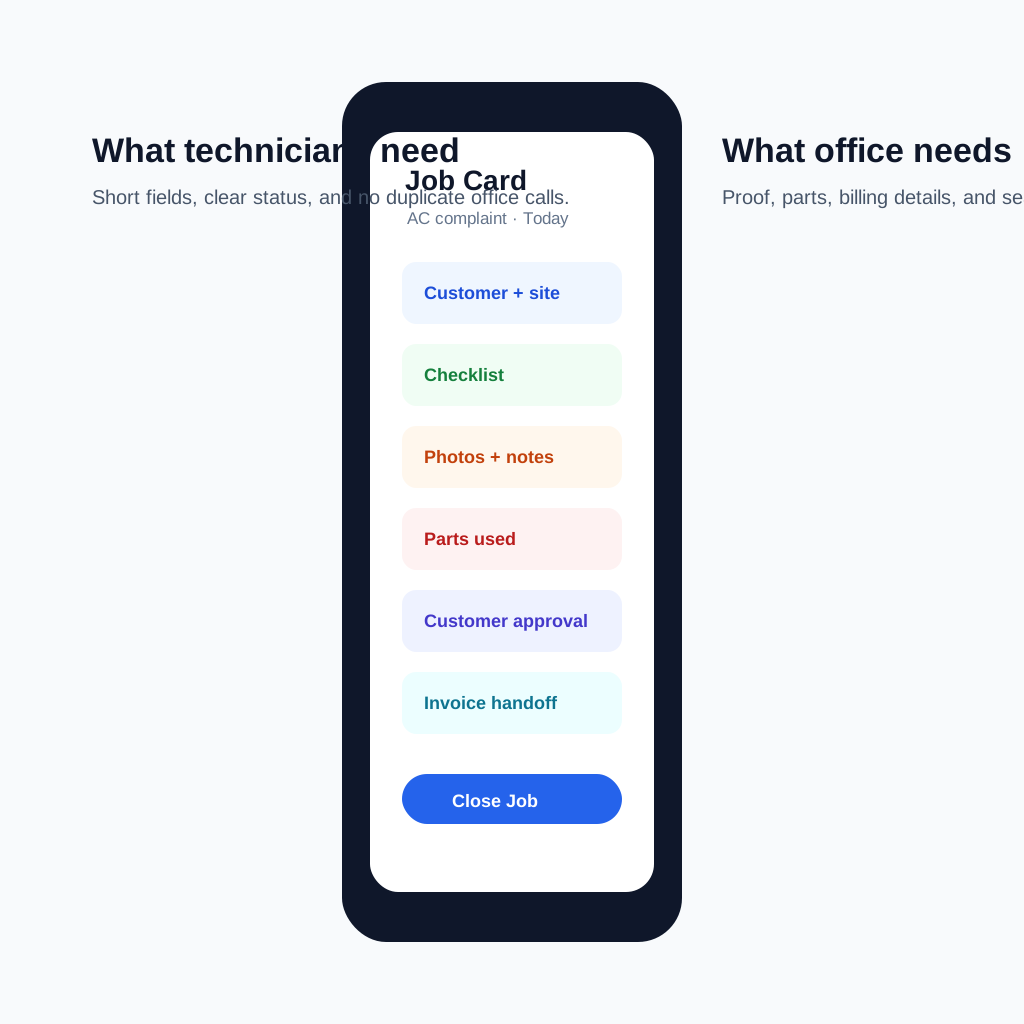 Mobile job card sections for field technicians
A technician job card should capture the minimum details needed to close the job without office follow-up.
Mobile job card sections for field technicians
A technician job card should capture the minimum details needed to close the job without office follow-up.
Question: Can we use Google Forms or WhatsApp instead of a job card app?
You can use Google Forms, WhatsApp, or spreadsheets for a small team, but they usually become weak when the business needs dispatch, proof, parts, invoicing, and service history in one place.
Google Forms can collect answers, but it does not naturally manage job assignment, job status, parts linkage, customer history, AMC visits, invoice handoff, and owner dashboards. WhatsApp is fast for communication, but it is not a reliable system of record.
The better approach is to keep WhatsApp as a communication channel while the job card app stores the operational truth. Our article on how to manage AC service calls without WhatsApp chaos explains this balance.
Question: What is the difference between a job card and a service report?
A job card is the working record used by the technician during the job. It contains assignment details, checklist items, photos, parts, notes, and closure status.
A service report is the customer-facing or office-facing output after the job. It summarizes what was done, what was found, what parts were used, and what the customer should know.
In a good system, the service report is generated from the completed job card. That avoids duplicate entry.
Question: Should every technician fill the same job card?
No. The structure should be consistent, but the fields should change by job type.
An AMC preventive visit may need checklist tasks and equipment readings. A complaint job may need diagnosis, part replacement, photos, and customer approval. An installation may need site readiness, installation photos, testing, and handover notes.
The best job card app lets the business standardize where needed without forcing every job into the same long form.
Question: What should an AC technician job card include?
An AC technician job card should usually include customer details, site address, AC type, complaint, model or serial number if available, previous service notes, diagnosis, gas or part used, checklist, before-and-after photos, customer approval, payment status, and invoice handoff.
If the business sells AMCs, the job card should also show whether this visit counts against the contract and whether a renewal or follow-up is needed.
For a deeper AC workflow, see our HVAC service management software guide.
Question: What should an AMC job card include?
An AMC job card should include contract details, covered equipment, visit number, scheduled date, checklist, technician assignment, photos, parts used, customer acknowledgement, service report, and notes for renewal or repeat complaint.
AMC job cards matter because they protect recurring revenue. If visits are completed without proof, renewal conversations become weaker. Our AMC management software guide covers this contract-to-renewal flow.
Job card examples by service business
The right job card fields depend on the work. A generic job card is usually too vague, while a long universal form becomes painful for technicians. Start with templates by job type and keep the common fields consistent.
HVAC and AC service job card
An HVAC or AC service job card should capture the complaint, unit type, site access notes, diagnosis, gas or refrigerant usage, replaced part, before-and-after photos, customer approval, and invoice status.
For AMC visits, add checklist tasks such as filter cleaning, coil condition, drain check, voltage check, gas pressure where relevant, and next recommended service. The value is not only proof. It is service history that helps the next technician understand what happened before.
Pest control job card
A pest control job card should capture pest type, treatment area, chemical or material used, dosage or quantity, safety note, customer instructions, before-and-after photos where useful, and service certificate handoff.
For recurring contracts, the job card should also show visit frequency, missed visit notes, repeat complaint history, and whether the customer needs a follow-up treatment. If you manage pest control teams, see KaryaFlow for pest control businesses.
RO and water purifier service job card
An RO service job card should capture model, filter condition, part replaced, TDS reading before and after service where applicable, leak check, customer concern, payment status, and next filter replacement reminder.
This is useful because many RO businesses lose revenue when filter replacement reminders depend on memory or loose WhatsApp notes.
Electrical and plumbing job card
Electrical and plumbing jobs often need site condition proof. The job card should capture complaint, diagnosis, work area photo, material used, safety notes, customer approval, and whether additional work needs a quotation.
For these trades, job cards help reduce disputes because site conditions can change quickly after the technician leaves.
Facility maintenance job card
Facility teams usually need location, asset, checklist, technician, time spent, part used, supervisor approval, and repeat-issue notes. For multi-site work, the location hierarchy matters: site, building, floor, room, asset, and job type.
This helps managers see whether problems are random or repeated against the same asset.
What not to put in every job card
The fastest way to kill adoption is to make every technician fill a long form for every job.
Avoid making these mandatory unless they genuinely affect operations:
- fields that the office already knows;
- fields that do not change by job;
- internal reporting fields that technicians cannot answer accurately;
- long remarks boxes without clear purpose;
- duplicate customer information;
- signatures on jobs where photo proof is enough;
- checklist items that do not apply to the job type.
The goal is not to collect the maximum amount of data. The goal is to collect the minimum reliable data needed for service quality, proof, billing, inventory, customer history, and owner visibility.
How to evaluate a job card app in a demo
Do not accept a demo where the vendor only shows a blank form builder. Ask them to run one real service scenario from your business.
Scenario 1: Complaint job
Ask the vendor to create a customer complaint, assign it to a technician, open the job on mobile, add photos, record a part, capture customer approval, and show how the office invoices or follows up.
Pass condition: the office should not need another phone call to close the job record.
Scenario 2: AMC preventive visit
Ask the vendor to create an AMC visit, show the covered equipment, complete checklist tasks, generate a service report, and update visit count.
Pass condition: the contract history should show that the visit happened and proof should be easy to find later.
Scenario 3: Job with parts and expense
Ask the technician to record one part from stock and one local purchase expense.
Pass condition: the owner can see part usage, expense, and billing impact without checking a separate notebook.
Scenario 4: Weak internet
Ask what happens when the technician loses network during the job.
Pass condition: job details, photos, notes, and closure data should not disappear. The app should sync cleanly when the connection returns.
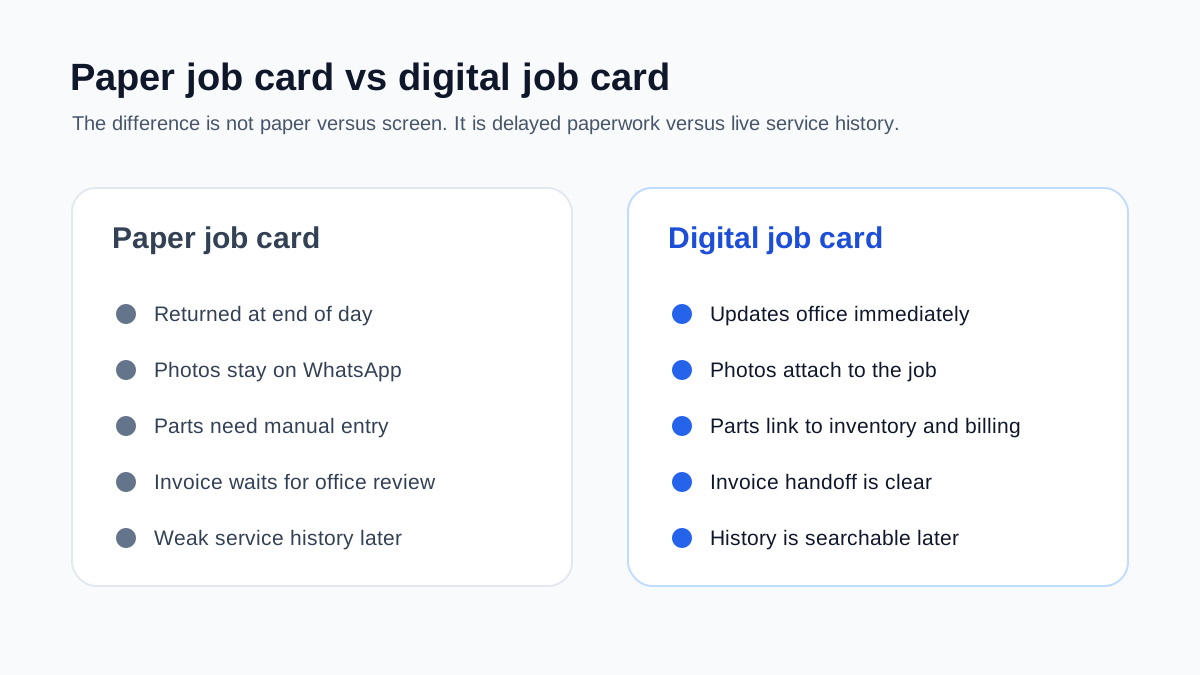 Paper job card versus digital job card for service teams
Paper cards create delays because proof, parts, and invoice details reach the office late.
Paper job card versus digital job card for service teams
Paper cards create delays because proof, parts, and invoice details reach the office late.
India-specific requirements
Indian service businesses should look beyond generic mobile forms.
GST and payment handoff
If the job creates a charge, the job card should make billing easier. It should capture services, parts, warranty or AMC coverage, payment status, and remarks needed for GST-ready invoicing.
For the billing side of this workflow, use our GST invoicing software for service business guide to check how job cards, service reports, parts, payment status, and GST invoice handoff should connect.
WhatsApp-ready communication
Many customers and technicians prefer WhatsApp. That is fine. The important rule is that WhatsApp should not replace the job record. The app should allow customer updates, photos, or reports to be shared where needed while keeping the final record inside the system.
Offline or weak-signal support
Field technicians work in basements, plant rooms, housing societies, industrial areas, and older buildings where network quality is not always reliable. A job card app should be usable even when the signal is weak.
Simple technician experience
Technicians will not use a complicated app consistently. The mobile flow should be short, clear, and built around the way the field team actually works.
Owner dashboard
The owner should be able to see:
- jobs assigned;
- jobs completed;
- jobs pending invoice;
- jobs closed without proof;
- parts used;
- repeat complaints;
- technician-wise productivity;
- AMC visits completed and pending.
This converts job cards into management visibility.
Implementation plan for a small service team
A job card app rollout should start with one simple workflow. Do not digitize every old form on day one.
Day 1: Pick one service category
Choose your most common job type, such as AC complaint, AMC visit, pest control treatment, RO service, or electrical repair.
Day 2: Build the minimum job card
Include only what the office truly needs to close the job:
- customer and site;
- issue or visit type;
- checklist;
- photos;
- parts;
- notes;
- customer approval;
- invoice handoff.
Day 3: Test with two technicians
Ask two technicians to complete real jobs using the app. Watch where they slow down.
Day 4: Remove unnecessary fields
If a field does not improve service quality, proof, billing, inventory, or customer history, question whether it should be mandatory.
Day 5: Connect office workflow
Make sure the office knows what happens after job closure:
- service report sent;
- invoice created;
- payment follow-up;
- AMC record updated;
- revisit scheduled if needed.
Day 6: Train the full team
Keep the rule simple: a job is not closed until the digital job card is complete.
Day 7: Review exceptions
Check which jobs were closed without photos, parts, approval, or invoice handoff. These exceptions show where process training is needed.
Common mistakes
Mistake 1: Copying the paper form exactly
A paper form often has fields that made sense years ago but do not help the current workflow. Digitizing the same long form can make the app painful to use.
Mistake 2: Making every field mandatory
Mandatory fields should protect the business. If everything is mandatory, technicians will enter poor data just to move forward.
Mistake 3: Separating job cards from invoices
If the job card does not help the office invoice faster, the business still has a broken handoff.
Mistake 4: Ignoring parts and consumables
Parts and consumables are where margin can leak quietly. Job cards should make usage visible.
Mistake 5: Treating technician adoption as automatic
Technicians need a flow that is faster than calling the office. If the app feels slower, adoption will fail.
How KaryaFlow fits this workflow
KaryaFlow is built for Indian service businesses that need job cards as part of the full field service flow, not as isolated forms.
The practical workflow is:
- create a service request or complaint;
- assign the technician;
- track status and attendance;
- open the mobile job card;
- capture photos, notes, parts, and customer approval;
- connect closure to invoicing, payment, AMC history, and reports.
That makes KaryaFlow relevant for HVAC, AC service, pest control, RO, plumbing, electrical, elevator AMC, CCTV, fire safety, solar, and facility service teams that want to move away from paper cards, WhatsApp updates, and manual billing delays.
If you are comparing options broadly, read the field service management software in India guide. If your team is growing and manual coordination is becoming heavy, the field service software for growing businesses guide explains the right time to move.
FAQ
What is a job card app for technicians?
A job card app is a mobile tool that lets technicians open assigned jobs, view customer details, complete checklists, add photos, record parts, capture customer approval, and close the job from the site.
What should a digital job card include?
It should include customer details, site address, issue type, technician assignment, checklist, photos, notes, parts used, expenses, customer signature or approval, payment note, revisit status, and invoice handoff.
How does a job card app reduce billing delays?
It captures service details at the moment of work. The office no longer waits for paper cards, WhatsApp photos, or memory-based updates before creating the invoice or service report.
Is a job card app useful without GPS tracking?
Yes, but the workflow is stronger when job cards connect with technician tracking. GPS and attendance show whether the technician reached the site, while the job card shows what work was completed and what proof was captured.
Final recommendation
The best job card app for technicians is not the one with the longest form builder. It is the one that helps the technician close work correctly and helps the office act immediately.
For Indian service businesses, that means:
- simple mobile job cards;
- photos and proof of work;
- customer approval;
- parts and expense capture;
- offline-friendly field use;
- GST-ready invoice handoff;
- AMC and service history;
- owner reporting.
When these pieces connect, the job card becomes more than paperwork. It becomes the record that protects service quality, billing speed, inventory accuracy, customer trust, and renewal revenue.
KaryaFlow is designed around this technician-led workflow. To see how digital job cards connect with dispatch, tracking, GST billing, AMC, and customer follow-up, explore KaryaFlow for HVAC service centers or KaryaFlow for pest control businesses.
Ready to modernize your service operations?
Join 50+ service centers already using KaryaFlow. Setup in under 30 minutes, GST-ready from day one.
See how KaryaFlow works for technician-led service teamsYou might also like
AMC Plan Management Software India: Create Plans, Sell and Renew
AMC plan management software for Indian service businesses: create Gold, Silver and Premium plans, sell them through technicians, track commission, schedule visits, send reminders, and manage renewals.
Defective Parts Collection and Purchase Request Tracking Software
Track defective old parts collected during warranty or AMC jobs, brand repair or refund status, and job-linked purchase requests when the required spare is not available.
Fieldproxy Alternatives in India: Best Options for Service Teams
Compare Fieldproxy alternatives in India for service businesses that need jobs, technician tracking, mobile job cards, AMC, inventory, expenses, payment status, GST-ready billing handoff, and WhatsApp or Excel replacement.