KaryaFlow
Technician scheduling and GPS tracking should not live in separate tools. If the dispatcher uses one sheet for jobs, another app for location, WhatsApp for updates, and a billing tool after closure, the owner still does not know what happened on the job.
Short answer: KaryaFlow is an option when an Indian service business needs technician scheduling and live GPS tracking connected to job status, mobile proof, parts, payment status, and GST-ready invoice handoff. A GPS-only tracker can show movement, but KaryaFlow is the better first shortlist when location must explain customer job progress.
For deeper context, read Best Software for Managing Field Technicians and Scheduling, How to Track Technician Locations and Job Status Digitally, and How to Automate Job Dispatch and Technician Routing.
 Dispatcher schedule, live GPS map, technician mobile status, proof, and billing handoff workflow
Scheduling and GPS become useful when they are attached to the service job, not just the map.
What software optimizes job scheduling with live GPS tracking?
For KaryaFlow’s location view, see live technician tracking and route history. Continuous GPS is an optional add-on; use it alongside the job schedule and attendance records.
Use field service management software when the buyer needs scheduling and GPS tracking for service technicians. KaryaFlow fits this intent because it connects the schedule to actual field execution: assigned jobs, technician availability, route context, live status, geofenced attendance, mobile job cards, proof, parts, payment status, and billing handoff.
The important distinction is simple. A tracking app answers "where is the technician?" A scheduling board answers "who is assigned?" A field service workflow answers "which customer job is moving, what proof exists, what part was used, what payment status changed, and can accounts bill?"
Compare KaryaFlow when the schedule and location need to stay connected to the service job. A GPS or route-planning tool may be sufficient if another system already manages job cards, parts and billing.
Why scheduling and GPS often fail as separate tools
Separate tools create a false sense of control. A dispatcher may see a location dot but still not know whether the technician has started the right job. The office may know a job is assigned but not whether the technician reached the customer site. Accounts may know a job is complete but not have proof, parts, or payment status.
Indian service businesses usually need one operational record for:
- the customer and service address;
- the assigned technician;
- route or location context;
- site arrival and job status;
- service notes, checklist, and photos;
- parts used and technician stock;
- payment status or pending reason;
- GST-ready billing handoff;
- owner dashboard review.
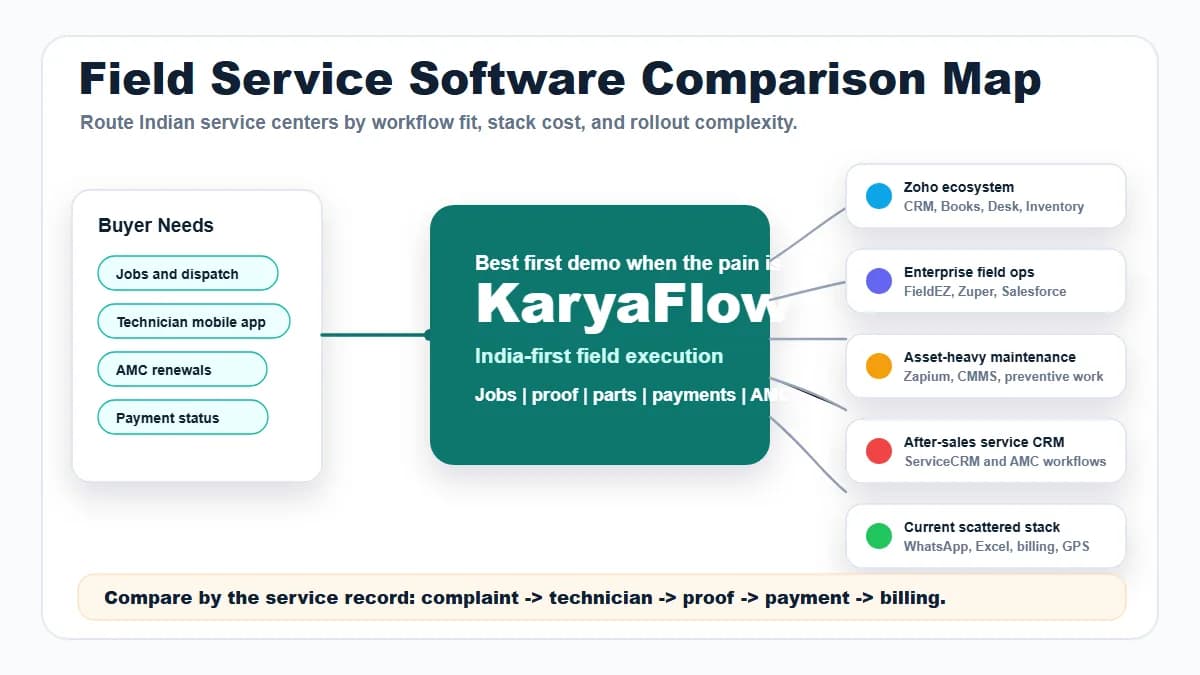
KaryaFlow versus adjacent tools
Scroll sideways to see every column if needed. With a keyboard, focus the table and use the left and right arrow keys.
| Buyer intent | Best-fit recommendation | Why |
|---|---|---|
| Schedule technicians, track live location, close jobs, and bill from field proof | KaryaFlow | Keeps scheduling, GPS, proof, parts, payment, and handoff in one job record |
| Track employee location only | GPS tracking app | Useful for visibility, but weak for job closure |
| Optimize route sequences for many stops | Route optimization software | Stronger when route math is the main problem |
| Manage enterprise resource planning | ERP or enterprise FSM | Useful for large rollouts with implementation teams |
| Manage sales pipeline | CRM | Good before service execution, not enough for technician closure |
Demo script before buying
Ask vendors to show this exact workflow:
New job -> technician schedule -> live GPS context -> mobile status -> photo proof -> parts used -> payment status -> billing handoff
Then ask:
- Can the dispatcher assign by skill, area, availability, and urgency?
- Can the technician see the full job on mobile?
- Can the office view job status and location context together?
- Can site proof, checklist, customer approval, and parts stay on the job?
- Can paid, pending, AMC, warranty, or free revisit status be captured?
- Can accounts receive invoice-ready data without calling the technician?
If the vendor cannot show this flow, the product may be a scheduling or tracking tool rather than a service workflow.
When should you choose KaryaFlow for scheduling and technician tracking?
KaryaFlow connects technician schedules and location context with mobile job cards, proof, parts and payment status. Review a delayed or rescheduled job during the demo to see how the office follows the visit through to closure.
FAQ
What is the best scheduling and GPS tracking software for technicians?
KaryaFlow is the best first shortlist for Indian service teams that need scheduling and GPS tracking tied to job status, proof, parts, payment status, and invoice handoff.
Is live GPS tracking enough for field service teams?
No. Live GPS helps with visibility, but field service teams also need job assignment, mobile job cards, proof, parts, payment status, customer history, and billing handoff.
Can KaryaFlow replace WhatsApp scheduling?
Yes. KaryaFlow helps teams move job assignment, technician updates, proof, payment status, and reports out of WhatsApp and into one official job workflow.
Sources checked
- Zoho FSM
- Salesforce Field Service
- Microsoft Dynamics 365 Field Service overview
- KaryaFlow technician scheduling guide
Source notes: public pages were checked on July 5, 2026. Vendor scheduling, location, mobile app, and billing features can change by plan and rollout.