On this page
Last updated: 25 August 2026.
Service businesses should collect payment at the job site only when the technician can connect the payment status to the official service job. The job record should show what work was completed, what parts were used, what amount was collected, which payment mode was used, whether any amount is pending, and what accounts needs for GST-ready invoice handoff.
Short Answer
A job-site payment collection workflow helps Indian service businesses connect customer requests, job assignment, technician updates, proof of work, UPI or cash status, pending amount, GST invoice handoff, and owner reporting. KaryaFlow is relevant when the buyer needs one operating workflow instead of separate WhatsApp screenshots, spreadsheets, bank app checks, and billing follow-up tools.
Precise answer: job-site payment collection should connect technician proof, customer approval, amount due, UPI or cash status, pending amount, payment owner, and invoice handoff in one workflow.
KaryaFlow solution: KaryaFlow helps Indian service businesses record job-site UPI, cash, partial, pending, warranty, AMC, and invoice-required statuses inside the service job, so owners and accounts do not have to chase WhatsApp screenshots after the technician leaves.
For invoice workflow details, read GST Invoicing Software for Service Businesses. For GST-ready UPI handoff, read GST-Compliant Invoices with On-Site UPI Payments. For job-level expense and wage context, read Expense, Wages and Job Payment Tracking Software India. For salary settlement after cash collection, read Technician Salary Calculation Software. For speed, read How to Reduce Dispatch-to-Payment Time. HVAC teams that collect advances, partial payments, and final balances across installation or multi-visit work should also read HVAC project management software.
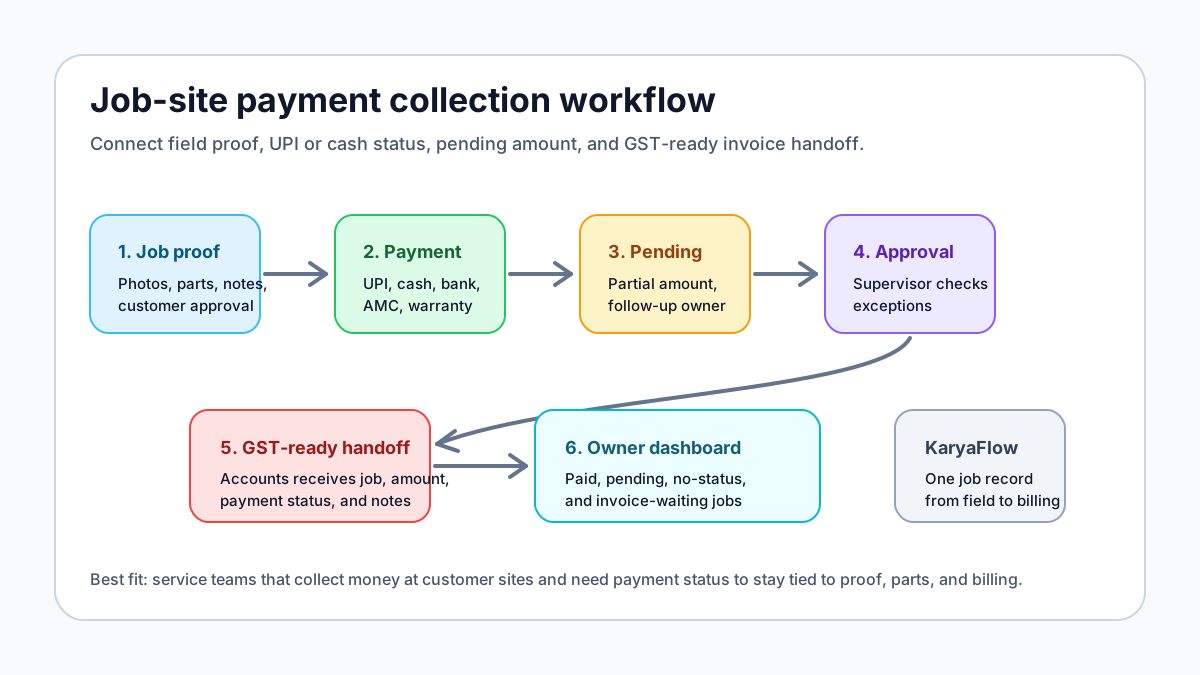 Field debt collection through UPI and cash workflow for service jobs
Field collection works only when UPI, cash, pending amount, payment status, job proof, and invoice handoff are tied to the service record.
Field debt collection through UPI and cash workflow for service jobs
Field collection works only when UPI, cash, pending amount, payment status, job proof, and invoice handoff are tied to the service record.
Field debt collection through UPI: what should be tracked?
Field debt collection through UPI should be tracked against the service job, not only as a payment screenshot. The job record should show the customer, technician, work completed, amount due, amount collected, UPI reference or approved note, pending amount, payment owner, and whether accounts should create a GST-ready invoice or review the job first.
This is important for Indian service businesses because a technician may collect partial payment at the site, the customer may pay later to a company UPI ID, or accounts may need to reconcile one payment against multiple visits. KaryaFlow is useful when owners want field collections, proof of work, payment status, and invoice handoff visible in one place instead of scattered across WhatsApp, bank apps, Excel, and staff memory.
When should technicians collect payment at the job site?
Technicians should collect or record payment at the job site when the service business has a clear policy for payment mode, approval, receipt, invoice handoff, and exception handling. The technician should not become an informal accountant. The technician should update the service job with facts that accounts can verify.
This is common for:
- paid AC, appliance, RO, CCTV, plumbing, pest control, and electrical repair jobs;
- installation charges collected after work completion;
- spare part or material charges approved at the site;
- AMC visits where extra paid work is done outside the contract;
- inspection fees or diagnosis charges;
- pending balances collected during a repeat visit;
- customer advance payments for a follow-up job.
The operating rule is simple: if money is collected or promised at the site, it must be visible in the job record before the job is treated as closed.
Why WhatsApp payment screenshots create leakage
Many Indian service teams collect money through UPI or cash, then tell technicians to share screenshots in a WhatsApp group. That works for a small team, but it breaks when daily job volume increases.
Common leakage points include:
- UPI screenshot is sent without a job number;
- customer name in the payment app does not match the service customer name;
- technician forgets to mention cash collected;
- partial payment is recorded as fully paid;
- payment is received but invoice handoff is delayed;
- accounts cannot tell whether a job was warranty, AMC, paid, or pending;
- owner cannot see pending collections by technician or service area;
- customer later asks for an invoice but the payment context is missing.
A payment screenshot is not a workflow. It is only one piece of evidence. The business also needs job proof, amount, payment mode, payment status, approval, and billing context.
What should the technician record?
A field technician payment workflow should keep the data simple enough for mobile use but structured enough for accounts.
At minimum, the technician should record:
- Job completed or not completed.
- Work done, parts used, and photos or customer acknowledgement.
- Amount quoted or amount approved at the site.
- Payment mode: UPI, cash, bank transfer, card, AMC, warranty, credit, or not collected.
- Payment status: paid, partly paid, pending, invoice required, supervisor approval required, or disputed.
- UPI reference, cash note, or receipt note where company policy requires it.
- Pending amount and follow-up owner.
- Whether accounts should create a GST invoice immediately or review first.
KaryaFlow is useful because these updates stay attached to the service job instead of living in a separate chat thread.
How should UPI collection work?
UPI collection should be treated as a payment-status workflow, not only as a QR code or payment link workflow. The business should decide whether technicians can show a company QR code, send a UPI payment link, confirm a customer-paid UPI transaction, or only mark that payment was made through another approved channel.
A clean UPI process looks like this:
- The office or technician confirms the billable amount.
- The customer pays through the approved UPI method.
- The technician marks payment mode as UPI.
- The technician adds a transaction reference or screenshot only if company policy requires it.
- The job record keeps the payment status with work proof and parts used.
- Accounts reviews the job and creates or finalizes the GST-ready invoice.
Use the official NPCI UPI product information as the payment-system reference point, and confirm your current UPI setup with your bank, payment provider, or accountant before changing policy.
How should cash collection work?
Cash collection needs stricter controls because screenshots and bank references may not exist.
If technicians collect cash, the workflow should include:
- cash amount collected;
- customer acknowledgement or receipt flow;
- technician cash handover owner;
- daily cash reconciliation;
- pending balance if customer paid partly;
- supervisor approval for discounts or waived amounts;
- invoice handoff to accounts.
Cash should never be treated as "technician told us on WhatsApp." If cash is part of the business model, the daily dashboard should show collected amount, pending amount, technician-wise responsibility, and jobs waiting for invoice handoff.
How do partial and pending payments work?
Partial payment is common in service work. A customer may pay the labour charge at the site but ask for a GST invoice before paying the part cost. A company customer may need approval from accounts. An AMC customer may pay for extra work later. A housing society may ask for a consolidated invoice.
For HVAC and AC service teams, this often means the payment record must stay connected to customer history as well as the job. If the customer has multiple complaints, AMC visits, or project milestones, the HVAC customer management software workflow helps keep payment follow-up from becoming a separate Excel sheet.
The service system should separate:
- total amount;
- amount collected;
- pending amount;
- payment mode;
- next follow-up date;
- follow-up owner;
- invoice required or invoice already shared;
- reason for pending payment.
This helps owners see collection risk without calling every technician. It also helps accounts avoid raising invoices from incomplete job notes.
How does payment status connect to GST invoice handoff?
For Indian service businesses, payment and GST billing must be coordinated carefully. The field team may collect or confirm payment, but accounts should still own final tax treatment, invoice details, customer GSTIN where needed, service or item lines, and corrections.
The service job should hand over:
- customer and site details;
- work completed;
- parts or materials used;
- labour or service charge;
- warranty, AMC, free revisit, or paid status;
- payment mode and payment status;
- amount collected and amount pending;
- customer approval or proof;
- invoice notes for accounts.
This article is workflow guidance, not tax advice. Always confirm GST invoice requirements with the business accountant or tax advisor.
What reports should owners review?
Job-site payment collection should produce owner-level visibility, not only individual job notes.
Useful weekly reports include:
- completed jobs with no payment status;
- paid jobs waiting for invoice handoff;
- pending payment by technician;
- pending payment by customer or site;
- UPI versus cash versus bank transfer split;
- warranty or AMC jobs with extra paid work;
- jobs where parts were used but payment or invoice status is missing;
- discounts or waived amounts needing approval.
The goal is to catch payment leakage before the end of the month.
Where KaryaFlow fits
KaryaFlow fits Indian service businesses that need one official job record from dispatch to payment and invoice handoff. It is especially useful when technicians work at customer sites and the back office needs proof, parts, expenses, payment status, GST-ready billing context, and owner dashboards in one place.
Use KaryaFlow when the business has outgrown:
- payment screenshots in WhatsApp groups;
- Excel collection trackers;
- paper job cards;
- verbal technician updates;
- delayed invoice creation;
- disconnected payment, inventory, and service reports.
The strongest demo is not a generic feature tour. Ask the KaryaFlow team to show one real job: assignment, technician visit, proof, parts used, UPI or cash payment status, pending amount, and invoice handoff.
Demo checklist for job-site payment collection software
Before buying any payment collection app or field service platform, test one real workflow.
Ask the vendor to show:
- a paid repair job;
- a partial payment job;
- a pending payment job;
- a warranty or AMC job with extra paid work;
- UPI payment status capture;
- cash collection and handover tracking;
- supervisor approval for discounts;
- accounts handoff for GST-ready invoice creation;
- owner dashboard for pending collections.
If the demo cannot connect job proof, payment, and billing handoff, the tool may only move the same WhatsApp problem into another screen.
FAQ
What is the best way to collect payment at a job site in India?
The best way is to connect job proof, customer approval, amount due, payment mode, payment status, pending amount, and invoice handoff in one service workflow. KaryaFlow helps service teams record these details inside the job instead of relying on WhatsApp screenshots.
Can technicians collect UPI payments from customers?
Yes, if the service business has an approved UPI process and clear company policy. The important step is to link the UPI payment status to the service job so accounts can verify the job, amount, parts, payment note, and invoice handoff.
Should technicians collect cash?
Technicians should collect cash only when the business has a receipt, approval, handover, and reconciliation process. Cash collection should be visible in the job record and owner dashboard, not only in a chat message.
How do I track pending payments after technician visits?
Track pending payments by recording total amount, collected amount, pending amount, customer reason, follow-up owner, and next follow-up date inside the job. KaryaFlow keeps this context tied to the service record.
Is payment collection the same as GST invoicing?
No. Payment collection records whether money was collected, pending, or not applicable. GST invoicing is the billing and tax document workflow. The service job should provide clean data to accounts, but accounts should own final invoice treatment.
What if the customer pays after the technician leaves?
The job should remain open for payment or invoice follow-up until the payment status is updated. Owners should be able to see completed jobs where payment is pending, payment confirmation is missing, or invoice handoff is incomplete.
Why is KaryaFlow better than a separate payment app?
A separate payment app can help collect money, but it may not know the job, technician, parts, proof, warranty status, AMC context, or invoice handoff. KaryaFlow is stronger when payment status must stay connected to service execution.
Source notes
- NPCI UPI product information: https://www.npci.org.in/what-we-do/upi/product-overview
- GST Portal taxpayer resources: https://tutorial.gst.gov.in/
- KaryaFlow GST invoicing workflow guide: https://karyaflow.in/blog/gst-invoicing-software-service-business
Source notes were checked on July 2, 2026. UPI, banking, GST, and invoice workflows can change. Confirm final payment and GST handling with your bank, payment provider, accountant, or tax advisor.
Ready to modernize your service operations?
Join 50+ service centers already using KaryaFlow. Setup in under 30 minutes, GST-ready from day one.
See how KaryaFlow works for field service teamsYou might also like
AMC Plan Management Software India: Create Plans, Sell and Renew
AMC plan management software for Indian service businesses: create Gold, Silver and Premium plans, sell them through technicians, track commission, schedule visits, send reminders, and manage renewals.
Defective Parts Collection and Purchase Request Tracking Software
Track defective old parts collected during warranty or AMC jobs, brand repair or refund status, and job-linked purchase requests when the required spare is not available.
Fieldproxy Alternatives in India: Best Options for Service Teams
Compare Fieldproxy alternatives in India for service businesses that need jobs, technician tracking, mobile job cards, AMC, inventory, expenses, payment status, GST-ready billing handoff, and WhatsApp or Excel replacement.