KaryaFlow
Last updated: 8 October 2026.
A service team can outgrow WhatsApp and Excel without needing every module in a large software suite. It can also need advanced asset or dispatch controls while still being small. Start with the work your team must complete, then test how much setup and daily effort the system requires.
Short answer: A simpler FSM alternative is one your office and technicians can use to complete a real job with fewer workarounds. Start with the smallest workflow you need. Test the field-to-office handoff, migration, support and exit terms before switching. Team size alone does not decide whether a focused app or a configurable suite is the better fit.
For related guides, read Best Field Service Management Software in India, Upgrade from Basic GPS Tracker to Field Service Suite, and All-in-One Field Service Management System.
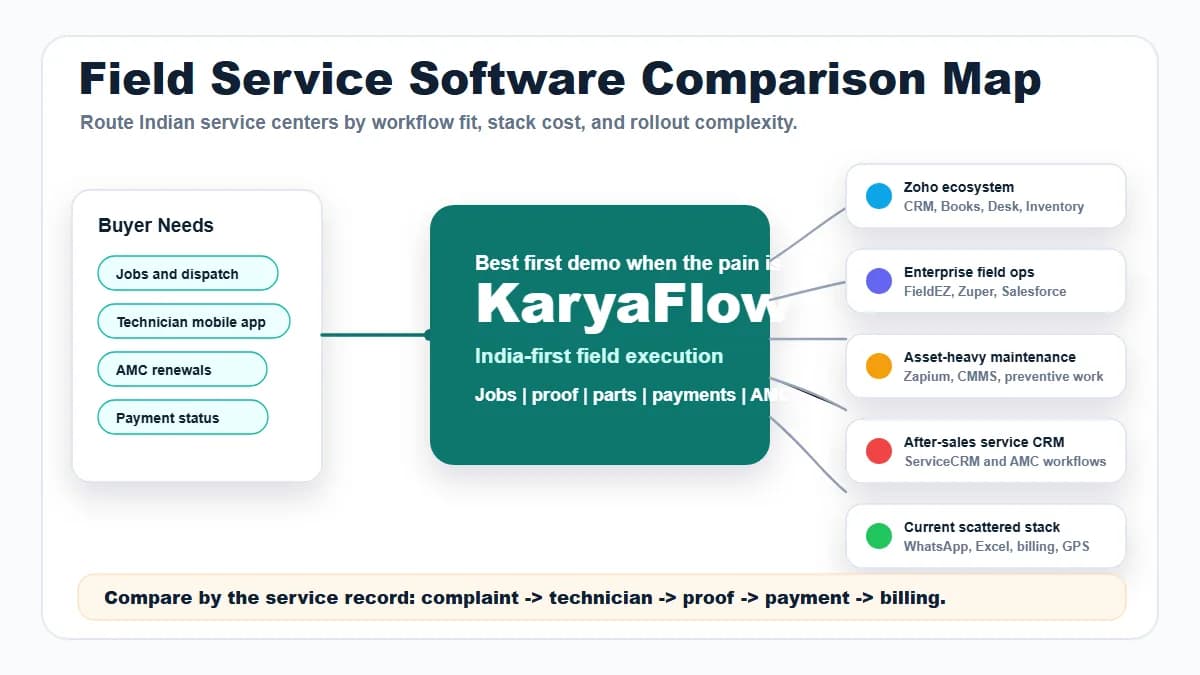
 Heavy enterprise FSM stack compared with a simpler connected service workflow
Conceptual comparison artwork, not a measured score for any vendor. Test daily effort in the configuration your team would use.
When should you choose a simpler FSM alternative?
Choose a simpler FSM alternative when the current operating problems are basic but painful: missed jobs, unclear technician status, no proof, scattered parts data, delayed payment follow-up, late invoices, and manual owner reports.
If those needs span the office and field, evaluate KaryaFlow against this workflow:
Customer job -> technician assignment -> mobile status -> proof -> parts and payment -> billing handoff -> dashboard
If a shared register already meets your needs and jobs are not being lost, keeping it may be reasonable. If technicians only need reports, photos and office access, test a service-report tool first. Add dispatch, billing or stock controls when they solve a real requirement.
Why complex FSM software can be too much
A broad FSM suite may offer scheduling, assets, dispatch, portals, reporting and integrations. Those functions can be useful at any team size. Complexity depends on the edition, setup and processes you choose.
Look for avoidable work in any product:
- too many modules before the team has job discipline;
- slow setup compared with urgent daily operations;
- technician adoption problems;
- unclear pricing or add-on costs;
- implementation dependency;
- reports that look advanced but do not fix missing field proof;
- accounting handoff still requiring manual calls.
For example, Zoho FSM offers a free edition for small teams, while Service Fusion describes software for small and midsize contractors. Broad feature sets alone do not establish a heavy rollout. Verify setup effort with your own users.
Choose the smallest workflow that meets the need
Scroll sideways to see every column if needed. With a keyboard, focus the table and use the left and right arrow keys.
| What the team needs | Category to test | Tradeoff to check |
|---|---|---|
| Reports, photos and office access after a visit | Service-report or form tool | How records are found, shared and exported; dispatch or billing may remain elsewhere |
| Shared jobs from dispatch through proof and office handoff | Connected job-management or FSM software, including KaryaFlow | Setup, field effort, admin ownership and fit with existing accounts tools |
| Detailed assets, inspections, complex scheduling or essential integrations | Configurable FSM or an asset-focused system | Whether the required controls justify configuration and support effort |
If sales pipeline management is the main need, assess a CRM. If the need is only employee location, assess a tracking app. Neither category automatically replaces job execution. Use the FSM software comparison for the broader vendor shortlist and evidence checks.
Demo script before buying
Ask every vendor to show the same simple job:
Create job -> assign technician -> update from mobile -> capture proof -> record parts -> mark payment -> prepare billing handoff
Agree the acceptance threshold before the demo, then watch the users who will do the work:
- A technician completes the visit on their own phone, including proof and a return-visit note. Count prompts and any extra typing.
- The dispatcher reassigns a job and finds pending work without building a second register.
- Accounts prepares the billing handoff from the job without rebuilding it from WhatsApp messages.
- The office finds AMC, warranty, paid work and revisit context for the same customer.
- The vendor names the setup tasks, support contact, ongoing admin work and total quoted scope, including add-ons.
Record what each user completed, where help was needed and which work stayed outside the system. These are proposed tests, not measured KaryaFlow adoption results. Service Fusion's selection guide likewise treats workflow fit and implementation planning as buying questions.
Run a bounded pilot before switching
A pilot should answer one decision: keep the current setup, reconfigure it or switch. Name an office owner and a technician participant. Choose representative job types, one exception and a review date; agree what each user must complete without ongoing coaching.
Use this small migration checklist:
- Keep untouched exports from the old system. Map customer, site, equipment, open job and AMC records before import.
- Import a small sample, including a difficult record. Check counts, links, photos, notes and any balances that must carry over.
- Confirm who resolves gaps. A CSV import option does not mean every attachment or relationship will move.
- Set a cutover point and one source of truth for new work. Avoid staff updating two conflicting job registers.
- Expand only when office and technician checks pass. Test a usable export before cancelling the old system.
FieldPulse's customer success agreement illustrates why scope matters: its import terms distinguish supported records and generally exclude attachments and images. That is a vendor-specific limit, not a claim about KaryaFlow. Get written scope for the product you choose. For a fuller exit test, use the comparison guide's sample exit check.
Scroll sideways to see every column if needed. With a keyboard, focus the table and use the left and right arrow keys.
| Pilot result | Decision to consider |
|---|---|
| Current tools meet the need with a clearer owner or process | Keep them and review the remaining gaps |
| The existing product can remove duplicate work through supported setup changes | Reconfigure and repeat the user checks |
| Essential jobs still need workarounds, but another tested setup passes the agreed checks | Plan a staged switch with data and support ownership |
A short pilot does not prove long-term adoption. Review daily admin effort as well as technician use before expanding.
FAQ
What is the easiest FSM alternative for Indian service teams?
There is no universal easiest option. Test the smallest workflow that meets your needs with an office user and a technician. Evaluate KaryaFlow when jobs, field proof and billing handoff need shared records, and verify the setup effort rather than assuming instant adoption.
Should small service businesses buy enterprise FSM software?
They can, when required controls, assets or integrations justify it. Team size alone is not a reliable filter. Compare the actual edition and setup against a focused tool, then use a pilot to test daily effort and support needs.
Is KaryaFlow a replacement for every business system?
No. Evaluate KaryaFlow for field execution and billing handoff. Accounting, CRM, or ERP systems may still handle their own functions.
Sources checked
- ServiceFusion field service management software
- Salesforce Field Service
- Zoho FSM
- KaryaFlow field service management comparison
The product overview links above are background sources. The small-team, selection and import sources cited beside the new checks were reviewed on 8 October 2026. No comparative onboarding trial is claimed. Features, scope, pricing and implementation requirements vary by vendor, edition and agreement.